Payment Confirmation page
💸 Confirm Transfer Details
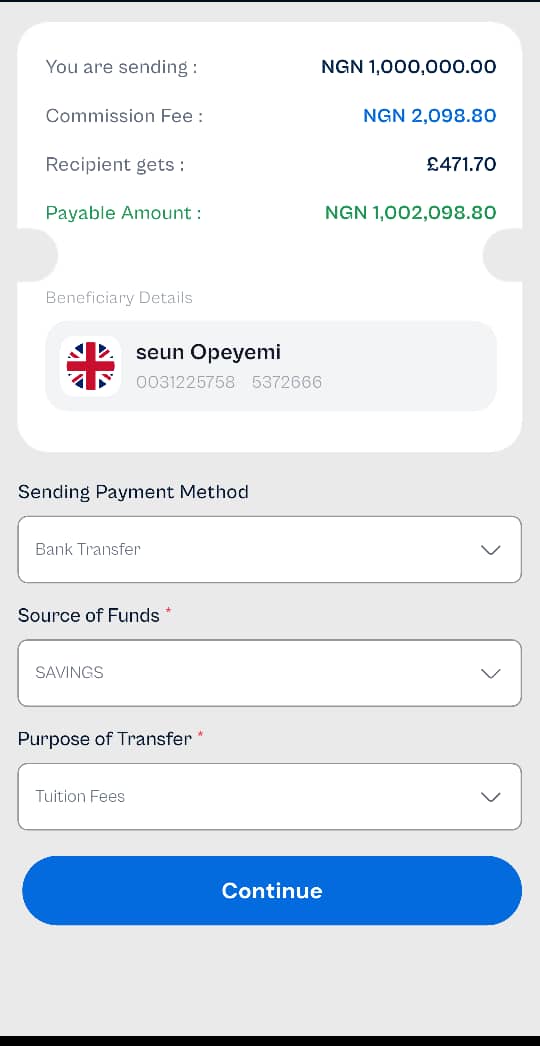
This screen summarizes the transfer details before the user proceeds to send funds to a selected beneficiary.
🔹 Transfer Summary
You are sending: ₦1,000,000.00
Commission Fee: ₦2,098.80
Recipient Gets: £471.70
Total Payable Amount: ₦1,002,098.80
The commission fee is automatically calculated and added to the amount to be deducted from your wallet or bank account.
🔹 Beneficiary Details
Displays the selected beneficiary’s profile:
Name: Seun Opeyemi
Account Number: 0031225758
Reference/ID: 5372666
Country: 🇬🇧 United Kingdom
🔹 Payment Inputs
The user is required to provide or confirm the following:
✅ Sending Payment Method
Options: Bank Transfer, Wallet (if available) Selected: Bank Transfer
✅ Source of Funds
Options: Savings, Salary, Business Income, etc. Selected: Savings
✅ Purpose of Transfer
Options: Tuition Fees, Family Support, Medical Bills, etc. Selected: Tuition Fees
These inputs help ensure compliance with local and international transfer regulations.
🔹 Action Button
- Continue:
Tap this button to proceed to the final confirmation or payment step.
🔒 Ensure all information is correct before continuing, as incorrect details may lead to delays or failed transactions.